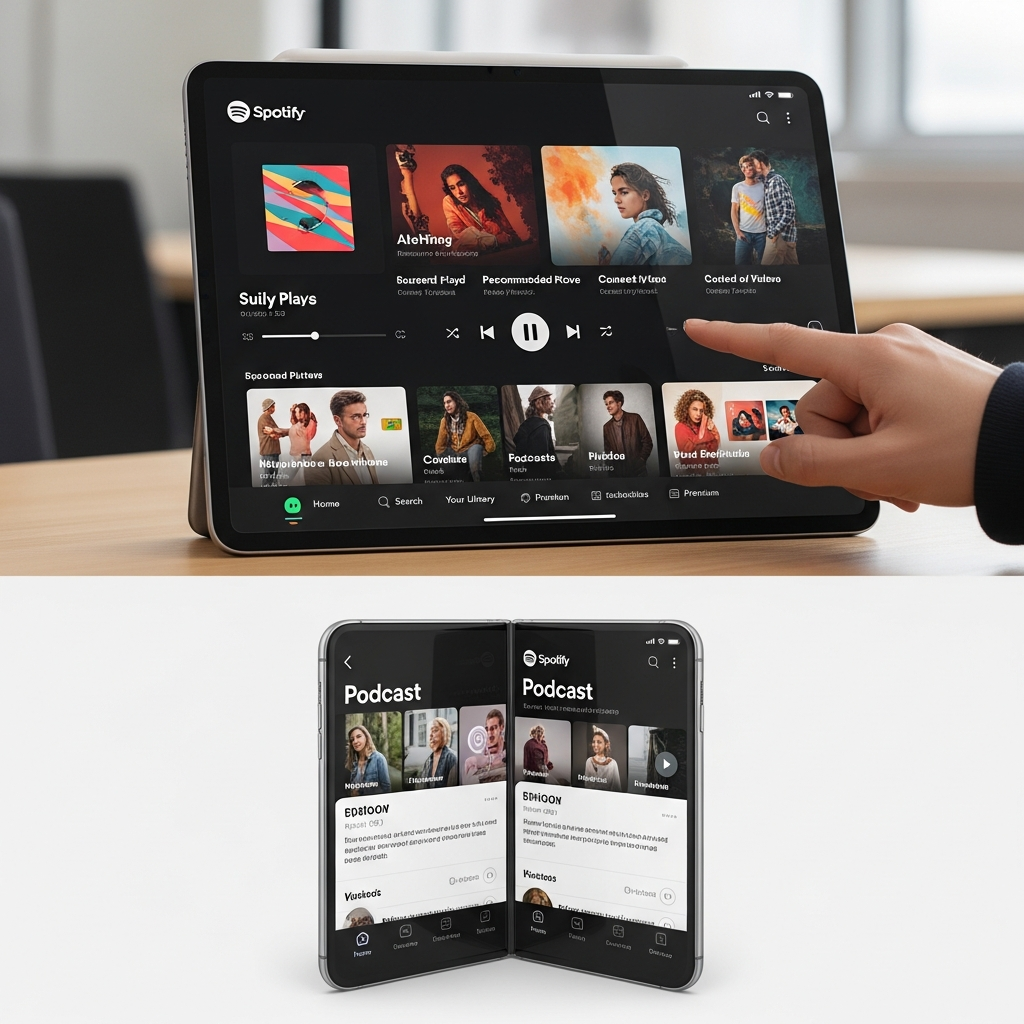
Spotify has officially launched a transformative Spotify tablet redesign, delivering a vastly enhanced experience for users on larger screens, including most foldable devices. This isn’t merely a scaled-up phone app; it’s a meticulously crafted interface designed to leverage every inch of screen real estate, promising a more intuitive and engaging journey for music, podcasts, and video. Rolling out to both Android and iOS tablets, this update signals Spotify’s commitment to a truly adaptive and unified experience across all user devices.
For years, tablet users have often felt like an afterthought, grappling with mobile interfaces awkwardly stretched across larger displays. Spotify’s previous iteration on tablets was frequently described as “clunky” and “desperately needing a refresh.” This new update directly addresses those pain points, introducing a “smarter, more responsive design” that adapts intelligently to how you use your device. From parallel browsing to a dynamic “Now Playing” panel, the Spotify tablet redesign empowers users to discover and enjoy content like never before.
Why the Spotify Tablet Redesign Matters Now
Tablets have become central to in-home entertainment, often used casually on a sofa or at a kitchen counter. Recognizing this shift, Spotify identified a crucial opportunity to refresh its experience on these devices. The goal was to make Spotify feel “native to each screen,” ensuring the platform is optimized whether you’re on a phone, TV, desktop, car, or now, a tablet or foldable. This strategic move aligns with Spotify’s broader vision of creating a seamless, evolving content ecosystem.
The redesign’s core philosophy is to move away from simply expanding its mobile layout. Instead, the design team focused on developing an experience that genuinely utilizes the extra screen space. Nicole Burrow, Head of Design, Consumer Experience at Spotify, highlighted this dedication, ensuring that “wherever you open Spotify, it should feel unmistakably like Spotify.” This isn’t just a cosmetic update; it’s a fundamental reimagining of how users interact with their favorite audio and visual content on larger form factors.
Unpacking the Key Features of the New Interface
At the heart of the Spotify tablet redesign are several groundbreaking features engineered to elevate the user experience. These additions focus on enhancing music discovery, multitasking, and overall ease of use.
One of the most notable changes is the introduction of a dedicated “Now Playing” panel positioned on the right-hand side. This allows users to keep an eye on their current track or video while other interactive elements remain accessible on the left. Crucially, this panel can be expanded to full-screen if desired, offering flexibility based on user preference. This design choice prevents the current playback from dominating the screen, freeing up space for browsing.
Furthermore, a new collapsible sidebar enhances navigation. This sidebar allows for parallel browsing and discovery without interrupting the media currently playing. It can expand for deeper focus on your library or new recommendations, or remain collapsed for a more minimalist view. This interactive, scrollable content within the sidebar is a simple yet significant improvement, enabling continuous exploration.
Adaptive Design and Foldable Compatibility
A standout aspect of the Spotify tablet redesign is its adaptive orientation. The interface no longer just resizes; it intelligently reconfigures itself when users switch between portrait and landscape modes. This ensures a balanced, intentional, and clean layout in both orientations, eliminating the awkward stretching that plagued previous versions. This fluid responsiveness is key to providing a truly native experience across varied screen sizes and aspect ratios.
While Spotify’s official announcement centered on tablets, the new UI generously extends to most Android foldable devices. Through practical testing, the updated design has been observed on devices such as the Galaxy Z Fold 7, Honor Magic V6, and Pixel 9 Pro Fold. This unexpected compatibility expands the reach of the enhanced interface to a rapidly growing segment of premium Android devices, offering foldable owners a much-improved way to interact with Spotify.
Addressing Foldable Inconsistencies
Despite broad compatibility, the new UI wasn’t universally available on all tested foldable devices, with the Oppo Find N6 notably not displaying the update. This sporadic availability suggests that while Spotify aims for wide support, some technical hurdles remain. Industry analysts speculate that these inconsistencies likely stem from optimization challenges, differing aspect ratios, or screen density variations unique to specific foldable models, rather than a deliberate exclusion. It underscores the complexity of developing a truly universal interface for the diverse Android ecosystem. Users encountering issues on their foldable might find that future app updates or device software adjustments could resolve these discrepancies.
Enhanced Discovery and Multitasking
The redesigned app excels in fostering music discovery. The smarter layout fully leverages the expanded screen real estate, enabling users to seamlessly explore playlists, albums, and recommendations without interrupting their current listening experience. This “parallel browsing” capability is a game-changer for multitaskers, allowing users to keep their music or video playing on one side of the screen while simultaneously diving into their personal library or new recommendations on the other. This separation of navigation and playback makes multitasking feel far more seamless and intuitive.
Beyond audio, the update also boasts an enhanced video experience. The “Switch to Video” toggle has been moved to a more prominent, front-and-center position, simplifying the transition into immersive video content. This strategic placement reflects Spotify’s growing investment in visual media, making it easier for users to engage with music videos, video podcasts, and other visual offerings within the app.
Despite the significant changes, the familiar bottom navigation bar – featuring Home, Search, Library, and Create options – has been retained. This ensures that core features remain easily accessible and intuitive for existing users, maintaining a sense of familiarity amidst the innovation. The collapsible side drawer also offers quick access to user profiles and settings, creating a blend of desktop and mobile experiences that critics argue is precisely what tablets required.
Spotify’s Broader Ecosystem and Future Vision
The Spotify tablet redesign isn’t an isolated event. It’s part of a larger, ongoing effort by Spotify to refine and expand its platform across various devices and content types. For instance, a redesigned Wear OS app went live in March, bringing new gestures and features to smartwatches. This parallel development highlights Spotify’s commitment to creating a consistent and high-quality experience across every device a user might own.
Beyond UI updates, Spotify continues to innovate in how users discover and engage with content. Recent announcements include AI-powered playlists that can now help users find podcasts, and features designed to make it easier to uncover the samples behind favorite songs. The platform is also significantly expanding its audiobooks offering, introducing features like “Page Match” (syncing audio with physical books) and “AI recaps.” Partnerships with platforms like Bookshop.org even allow users to purchase physical books directly from within the Spotify app in select regions, demonstrating a clear strategic pivot towards becoming a comprehensive audio and literary hub.
This strategic direction underscores Spotify’s ambition to be more than just a music streaming service. By continually enhancing the user experience across different form factors and diversifying its content offerings, Spotify aims to solidify its position as the go-to platform for all things audio and beyond. The Spotify tablet redesign is a crucial piece of this puzzle, ensuring that even on larger screens, the user journey remains intuitive, engaging, and deeply personalized.
Frequently Asked Questions
What are the main new features of Spotify’s tablet and foldable app redesign?
The new Spotify tablet and foldable app redesign introduces several key features for an enhanced experience. These include a dedicated, collapsible “Now Playing” panel on the right side for uninterrupted listening, an adaptive design that intelligently reconfigures for portrait and landscape modes, and “parallel browsing” which allows users to explore their library or recommendations without pausing current playback. The interface also features an enhanced video experience with a more prominent “Switch to Video” toggle and a new collapsible sidebar for navigation.
Which devices are compatible with the new Spotify tablet app, and how do I get the update?
The new Spotify tablet app experience is widely available for both Android and iOS tablets. It also extends to most Android foldable devices, with confirmed compatibility on models like the Galaxy Z Fold 7, Honor Magic V6, and Pixel 9 Pro Fold. To get the update, ensure your Spotify app is updated to the latest version via your device’s app store (Google Play Store for Android, Apple App Store for iOS). The rollout began officially in mid-April, so it should be broadly accessible to all users.
How does this new Spotify tablet experience improve music discovery and multitasking?
The redesigned Spotify tablet app significantly improves music discovery and multitasking through its “smarter, more responsive design.” Features like parallel browsing allow users to simultaneously listen to music or watch a video while exploring new playlists, albums, or recommendations on the other side of the screen. The dedicated “Now Playing” panel and collapsible sidebar further facilitate this by keeping current media visible and interactive without dominating the display, making the process of finding new content seamless and less disruptive.
Conclusion
The Spotify tablet redesign represents a pivotal moment for the streaming giant, moving beyond merely scaling mobile interfaces to deliver a truly native and optimized experience for larger screens. With its adaptive UI, parallel browsing capabilities, and dedicated “Now Playing” panel, Spotify has addressed long-standing user frustrations, making discovery and multitasking on tablets and foldables more intuitive than ever before. This update, coupled with Spotify’s ongoing expansion into audiobooks and AI-powered features, underscores a strategic vision for a unified and comprehensive content platform across all devices. For users, it means a richer, more engaging way to connect with their favorite audio and visual content, ensuring that Spotify remains an indispensable part of their digital lives.