
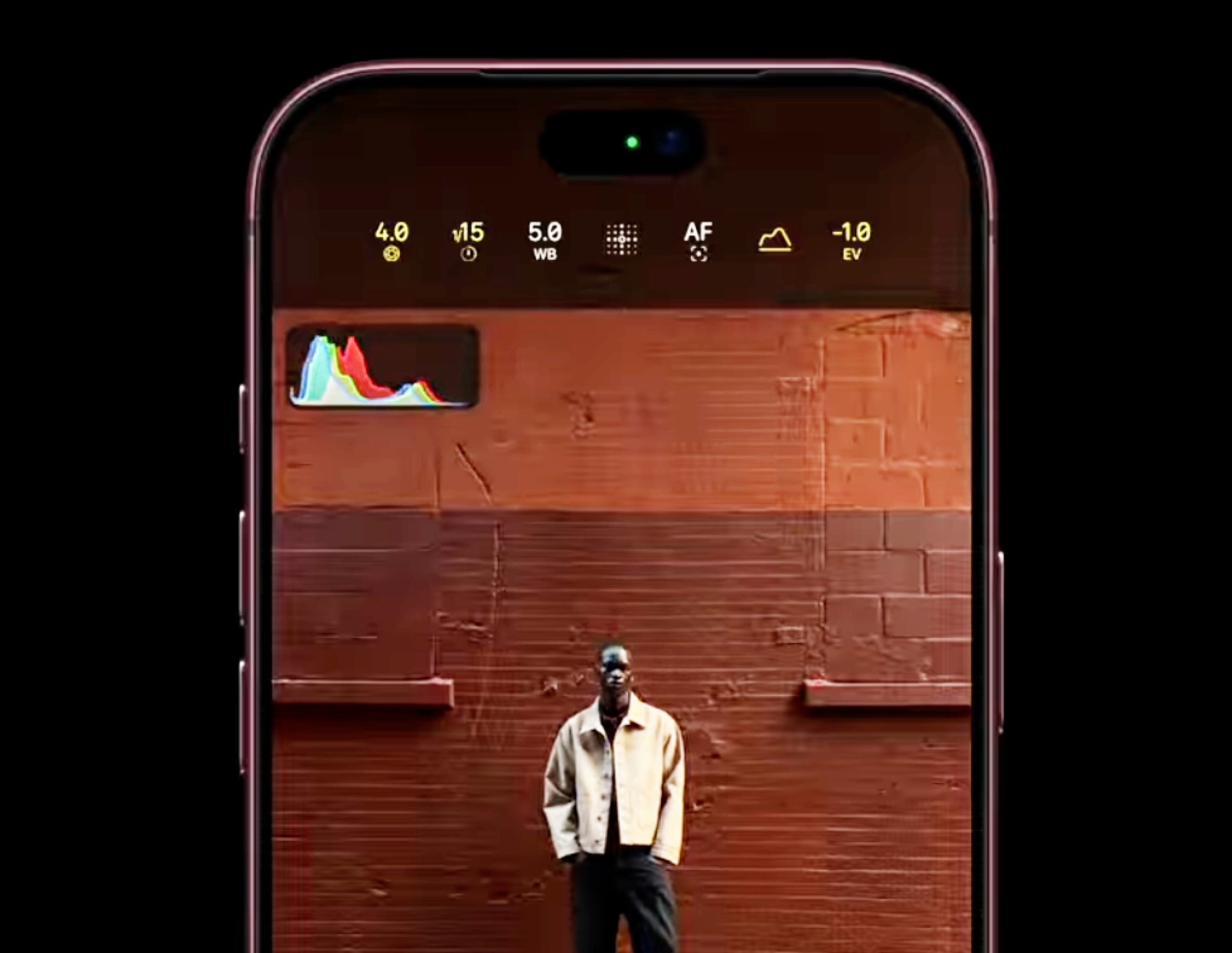
The upcoming iOS 27 Camera upgrades are set to transform the iphone from a standard point-and-shoot device into a professional-grade tool through deep customization and advanced artificial intelligence. According to reports from Notebookcheck News and CNET, Apple is preparing a massive software overhaul scheduled for release on Monday, September 14, 2026, aimed at bridging the gap between casual smartphone users and professional photographers.
Key Takeaways
- Major Software Update: iOS 27 is scheduled for a wide release on September 14, 2026, supporting devices from the iPhone 11 through the iPhone 17 Pro.
- Siri AI Integration: A new “Siri mode” within the Camera app uses visual intelligence to identify objects, translate text, and provide real-time information.
- Deep Customization: Users can now personalize the Camera UI using “widgets” and a new editing panel to streamline their specific workflows.
- Hardware Exclusivity: The iPhone 18 Pro and Pro Max will receive exclusive manual “Pro controls,” including variable aperture and advanced histogram viewers.
- AI-Driven Assistance: Beyond photography, the update integrates a more proactive, “always-on” Siri agent capable of cross-app actions.
- Translate Language: Snap an image of text in a foreign language for instant translation.
- Manage Schedules: Capture an event flyer to automatically extract details and add them to the user’s calendar.
- Identify Objects: Receive immediate care instructions for a specific plant or nutritional data for food items.
- Remove Unused Controls: Clear out features like the timer or flash if they are not part of the user’s routine.
- Add Favorites: Pin frequently used settings to the top of the screen for instant access.
- Categorize Settings: As noted by Nelson Aguilar in the CNET report, these widgets can be organized into categories such as Basic, Manual, and Settings, allowing for a cleaner, less cluttered interface.
- For Professional Photographers: The introduction of manual controls and reference images makes the iPhone a much more viable tool for serious work. The ability to bypass certain computational processing via Reference Mode provides the control necessary for professional editing workflows.
- For Casual Users: The Siri AI mode and the improved UI mean that the camera becomes more intuitive. You won’t need to search through menus to translate a sign or add a date to your calendar; the camera simply “knows” what you are looking at.
- For Tech Enthusiasts and Investors: The integration of third-party AI like ChatGPT and Gemini indicates Apple’s willingness to embrace an open AI ecosystem to maintain competitiveness, a move that could signal significant shifts in Apple’s long-term software strategy.
- For Owners of Older Hardware: If you are using an iPhone 11 or newer, you will receive the core UI and AI benefits, providing a sense of longevity to your device, even if you miss out on the physical aperture controls of the 18 Pro.
- www.notebookcheck.net
- www.cnet.com
- 9to5mac.com
What Happened
Apple is poised to roll out iOS 27 this September, marking one of the most significant structural changes to the iPhone’s user interface in recent years. While the update will be compatible with a broad range of legacy hardware—specifically spanning from the iPhone 11 up to the iPhone 17 Pro—the depth of the experience will vary significantly based on the device’s processing power and optical hardware.
As reported by Hannes Brecher via Notebookcheck News, the update focuses heavily on UI efficiency. The traditional Camera app interface is being redesigned to move key controls to more accessible locations, such as a new menu button positioned to the right of the shutter button. This change is intended to reduce the number of steps required to access essential settings, moving toward a “one-click” philosophy.
Simultaneously, reports from Bloomberg’s Mark Gurman, as detailed by CNET, suggest that the broader iOS 27 ecosystem is undergoing a fundamental shift. The operating system is moving away from rigid, default layouts toward a flexible, “shapeable” interface. This evolution is most visible in the Camera app, which is transitioning from a simple capture tool into a sophisticated, customizable workstation.
Why It Matters: The Shift to Software-Defined Photography
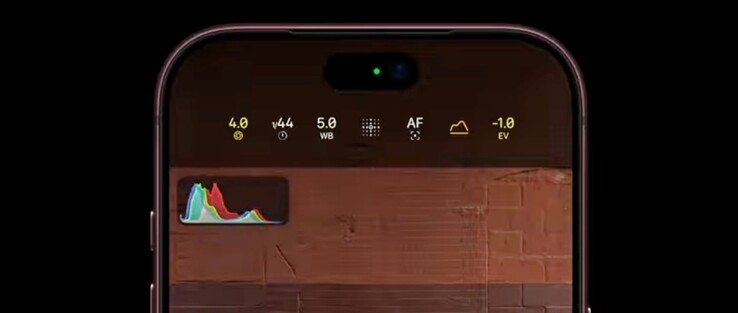
For years, the distinction between a standard iPhone and a “Pro” model was defined primarily by lens count and sensor size. However, the iOS 27 Camera upgrades signal a shift toward software-defined photography. By introducing professional-grade manual controls through software, Apple is increasing the utility of its existing ecosystem, allowing users with older hardware to access advanced features like white balance adjustment and focus control.
This update also represents a strategic pivot in how Apple approaches artificial intelligence. Rather than treating AI as a standalone feature, iOS 27 integrates it directly into the user’s visual field. The introduction of “Siri mode” means the camera is no longer just a way to capture light; it is a sensor for a sophisticated AI agent. This integration allows the iPhone to act as a real-time interpreter, researcher, and personal assistant.
Deep Dive: The New Siri AI Mode and Visual Intelligence
One of the most anticipated features of the update is the new Siri mode. This feature, which requires enabling Siri AI support on compatible models, brings visual intelligence capabilities directly into the full Camera app interface.
Instead of merely taking a photo, users can use the viewfinder to interact with the world. According to the primary source documentation, Siri mode allows users to:
CNET reports that this is part of a larger transformation of Siri into an “always-on” AI agent. This new Siri is expected to integrate more deeply with the Dynamic Island and may even support third-party AI services such as ChatGPT and Google Gemini. This move suggests Apple is attempting to compete directly in the generative AI space by making its assistant more proactive and conversational.
Customizable Controls and the “Widget” System
To accommodate both casual users and enthusiasts, Apple is introducing a highly flexible UI. In previous versions of iOS, the Camera app offered a relatively fixed set of buttons at the top of the screen. In iOS 27, these are being replaced by a system of customizable “widgets.”
When a user enters a mode like Photo, Video, or Portrait, they can tap an icon featuring six dots in the bottom-right to open the controls panel. A new “Edit” button in the top-left corner allows users to:
This level of customization is designed to solve a long-standing criticism from power users: that Apple’s default layouts are too restrictive for professional workflows.
iPhone 18 Pro Exclusives: Pushing the Hardware Limits
While the software update brings significant improvements to older models, Apple is maintaining a clear hierarchy through hardware-exclusive features. The iPhone 18 Pro and iPhone 18 Pro Max will serve as the flagship platforms for the most advanced photographic capabilities.
Comparison of Camera Feature Availability
| Feature | iPhone 11 through 17 Pro | iPhone 18 Pro / Pro Max |
|---|---|---|
| Siri Mode (AI) | Supported (on AI-compatible models) | Supported |
| Customizable UI | Supported | Supported |
| Manual White Balance | Supported | Supported |
| Manual Shutter Speed | Supported | Supported |
| Histogram Viewer | Supported | Supported |
| Variable Aperture | Not Supported | Supported |
| Photographic Styles 3 | Limited/Standard | Full Texture & Grain Control |
| Apple Reference Mode | Not Supported | Supported |
Pro controls on the iPhone 18 Pro series include manual adjustments for lens aperture, shutter speed, white balance, and a real-time histogram viewer. Furthermore, the new Photographic Styles 3 provides enhanced texture and grain controls, allowing for a level of granular aesthetic tuning previously unavailable on the iPhone.
Another high-end addition is Apple Reference Image. This feature allows users to capture and view “digital negatives,” which act as a baseline to verify exactly what the camera sensor originally captured before any software processing or computational photography adjustments were applied. This is a critical tool for professional photographers who need to ensure color accuracy and exposure integrity.
What It Means for You
Depending on your relationship with the iPhone ecosystem, the impact of iOS 27 will be felt differently:
Counterpoints and Open Questions
Despite the excitement, several concerns remain. The most prominent is privacy. An “always-on” AI agent that uses personal data to perform actions across various apps raises significant questions about how much of a user’s visual and personal life is being processed by Apple’s servers. While Apple has historically prioritized on-device processing, the complexity of advanced generative AI may necessitate cloud-based computation.
There is also the risk of increased complexity. While customization is a boon for power users, the addition of “widgets,” multiple menu layers, and advanced manual settings could overwhelm casual users who simply want to take a quick photo of their lunch.
Finally, there is the issue of hardware fragmentation. By locking the most significant optical features, such as variable aperture, to the iPhone 18 Pro, Apple continues a cycle of planned obsolescence that may frustrate users who feel they are paying for a “Pro” experience on slightly older flagship models.
What Happens Next
The immediate timeline for iOS 27 is clear. Following the anticipated unveiling at WWDC26 (scheduled for June 8–12, 2026), developers will have the opportunity to test the new APIs and AI integrations. The general public can expect the official software rollout to begin on Monday, September 14, 2026.
Watch for Apple’s official documentation regarding exactly which manual features will be enabled on the iPhone 11 through 17 Pro range, as current reports suggest some ambiguity regarding the extent of the rollout for legacy devices.
Frequently Asked Questions
Will my current iPhone work with the new iOS 27 Camera features?
Most iPhones released from the iPhone 11 onwards will be compatible with iOS 27. However, the specific features you can access will depend on your hardware. While all compatible models will receive the new customizable UI and Siri AI mode, advanced manual controls like variable aperture and certain Photographic Styles are strictly limited to the iPhone 18 Pro and Pro Max models.
What is “Siri mode” in the Camera app?
Siri mode is a visual intelligence feature that uses the iPhone’s camera to interact with the real world. By pointing your camera at objects, text, or plants, Siri can perform tasks such as translating foreign languages, identifying plant species, extracting event details for your calendar, or providing nutritional information for food. It essentially turns your camera into an active, AI-powered sensor.
How do the new customizable controls work?
In iOS 27, you can move away from the standard camera layout by using a new “Edit” function within the controls panel. By tapping the six-dot icon and selecting “Edit,” you can add or remove “widgets”—specialized control buttons—to the top of your camera screen. This allows you to create a custom interface that only shows the tools you use most frequently, such as flash, exposure, or timer.
Is the new Siri “always-on”?
Reports from Bloomberg suggest that the new Siri is moving toward an “always-on” AI agent model. This means it will be more proactive, capable of using personal data to assist you across different apps and responding to more complex, conversational queries. This is a significant departure from the more reactive Siri versions of the past.
Apple’s upcoming iOS 27 release represents a major evolution in how the iPhone handles both photography and artificial intelligence
References
Featured image: Image via Notebookcheck


2 thoughts on “iOS 27 Camera Upgrades Explained: What New Features Mean”