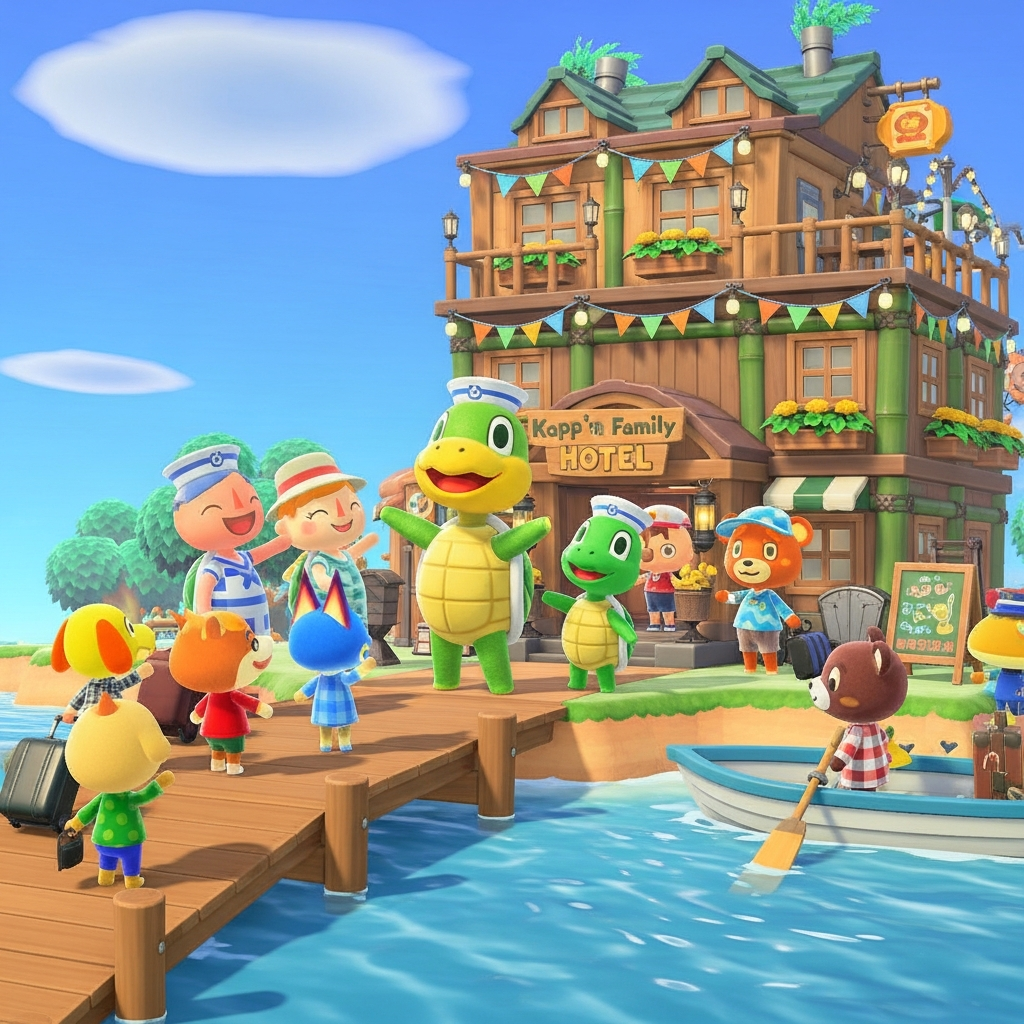
Animal Crossing: New Horizons players can now experience island life with a significant expansion: Kapp’n’s Family Hotel ACNH. This ultimate guide dives deep into every aspect of this exciting feature, transforming your island’s pier into a bustling resort. Discover exactly how to unlock the hotel, master room decoration, earn exclusive Hotel Tickets, and unlock new customization options that breathe fresh life into your island adventure. Get ready to welcome new guests and expand your Animal Crossing horizons!
Unlocking Kapp’n’s Family Hotel: Your Island’s New Landmark
The grand opening of Kapp’n’s Family Hotel is a major highlight of Animal Crossing: New Horizons’ 3.0 update. This unexpected yet highly anticipated addition offers a fresh layer of gameplay and interaction. Unlike some features, the hotel doesn’t require a special questline to initiate. Instead, its unlocking conditions align with other significant island developments.
Prerequisites for Hotel Construction
For most players with well-established islands, Kapp’n’s Family Hotel will appear automatically after installing the 3.0 update. However, if you’re a newer player, you’ll need to meet a fundamental requirement: upgrading Resident Services from its initial tent form to a permanent building with a plaza. This milestone also unlocks other key features like the Happy Home Paradise DLC and the Campsite, indicating a progression point where your island is ready for more complex structures.
You’ll know the hotel is ready when Isabelle makes a special announcement during her morning broadcast. She’ll excitedly share the news of Kapp’n’s family establishing their new business on your island’s southern pier.
Day One: Grand Opening, Seaside Rooms, and New Opportunities
Once Isabelle broadcasts the good news, it’s time to explore your island’s newest attraction. Head to the pier on the southern coast – its exact location varies by island layout, but it’s consistently found across the river from Resident Services. You’ll find the elegant hotel already constructed and ready for its first guests!
A Family Welcome and Unfinished Business
Upon entering the lobby, you’ll be greeted by Tom Nook, Kapp’n, and his charming wife, Leilani. Leilani quickly reveals that while the building is ready, the guest rooms are far from complete. This is where you step in! Your interior design skills are needed to get the hotel up and running. During this initial phase, Kapp’n will be preoccupied inside, temporarily unavailable for his beloved Boat Tours.
Decorating Room 1: The “Seaside Room”
Leilani at the reception desk will task you with designing the first guest room: the “Seaside Room.” This theme provides a perfect introduction to the hotel’s decorating mechanics, which will feel familiar if you’ve enjoyed the Happy Home Paradise DLC.
Here’s a breakdown of the decorating process:
Theme Alignment: Your primary goal is to use items that complement the assigned theme.
Recommended Tab: The most helpful tool is the “Recommended” tab in your item menu (accessible via the Right D-Pad). This tab features items perfectly suited for the room’s theme, even displaying items you don’t yet own (marked with a blinking red dot), which means no last-minute shopping sprees!
Decorating Mode: For efficient placement and arrangement, use Decorating Mode (Down D-Pad when not in the Storage Menu).
Customization: Items marked with a paintbrush icon can be customized. Press X in the item menu or Down D-Pad in Decorating Mode to access customization options.
HHP Integration: If you own the Happy Home Paradise DLC, all your unlocked design features – including polishing, room size adjustments, window and entryway modifications, lighting, and soundscapes – are fully usable within the hotel rooms, offering unparalleled creative freedom.
Nintendo Switch 2 Edition Bonus: Players on the Nintendo Switch 2 Edition can leverage JoyCon 2’s Mouse Controls for precise decorating, with the right JoyCon 2 functioning as a mouse.
Final Touches: Don’t forget the small details! You can interact with windows and blinds using the A Button to open or close them.
After meticulously decorating, you’ll need to take a representative photo of Room 1 using your NookPhone’s Camera App. Utilize all camera features, including Camera Pro, to capture the perfect shot. Once satisfied, press the + Button to finalize the room’s image. Speak to Leilani and select “All done!” to complete your first design task.
Your First Guest and Rewards
As you return to the lobby, Leilani congratulates you just as the hotel’s first guest, a random villager, arrives! After showing them to their newly decorated “Seaside Room,” Leilani will reward your efforts with 200 Hotel Tickets. You’ll also achieve a new Nook Milestone, earning 300 Nook Miles and the “Chill” and “Organizer” title keywords. This completion simultaneously unlocks Room 2 and Gram’s Souvenir Shop.
Gram’s Souvenir Shop: Exclusive Finds
Gram’s Souvenir Shop functions similarly to Nook’s Cranny, offering a daily rotation of exclusive items only available at the hotel. You’ll spend your newly acquired Hotel Tickets here.
Daily Stock: Check the physical storefront next to Grams for her daily offerings.
Catalogue Ordering: Speaking to Grams grants access to a comprehensive catalogue of all exclusive items. However, buying directly from the storefront is about 30% cheaper than ordering from the catalogue.
Expansion Incentive: Grams will hint that her catalogue expands as more guests stay at the hotel, encouraging you to decorate more rooms and attract new visitors to unlock a wider array of unique items.
Decorating Room 2: Japanese or Modern?
For Room 2, Leilani presents you with a choice: a “Japanese Room” or a “Modern Room.” Select the theme that sparks your creativity. The decorating process is identical to Room 1 – use the “Recommended” tab, leverage Decorating Mode, and take your time creating a welcoming space.
Pro Tip for Theme Changes: If you change your mind about a room’s theme, simply try to exit the room. Leilani will ask if you wish to quit; select “Yar. I’m quittin’.” and “Sure.” You’ll return to the lobby, and upon speaking to Leilani again for that room, you can restart and pick a different theme. Completing Room 2 earns you another 200 Hotel Tickets. That concludes your decorating tasks for Day 1!
Tom Nook’s DIY Requests: Promote and Earn
After your initial hotel conversation, Tom Nook will flag you down outside. He needs your help crafting specific DIY items that Kapp’n will deliver as island promotions. This is an excellent way to earn additional Hotel Tickets.
Here’s how this system works:
Request Box: A box with a sign outside the hotel displays four daily DIY requests. While you can see the items, materials aren’t shown here.
DIY Recipes Tab: Check the new “Requests” tab on the far right of your DIY Recipes menu (also available at any crafting bench) to see required materials.
Bonus Tickets: The first four DIY requests you complete each day award a x2 bonus on Hotel Tickets, so prioritize these!
Refreshing Requests: After completing a request, a new one takes its place, though without the bonus. DIY requests refresh weekly every Monday.
Efficiency Tip: Place a DIY Bench and a Storage Shed right next to the request box on the pier for maximum efficiency. Consider using a Mario Warp Pipe for quick travel from Resident Services.
Once you’ve finished these tasks, Kapp’n will resume his Boat Tours, albeit from a slightly adjusted spot on the pier.
Day Two: Hotel Outfits and More Themed Rooms
Welcome to Day 2 of your hotel management journey! Upon entering the lobby, you’ll find Leilani attending to two mannequins. These are for the hotel’s new Hotel Outfits, which guests and visiting players can wear during their stay.
Customizing Hotel Outfits
You have full creative control to customize these outfits. Design something chic, quirky, or perfectly thematic for your resort. Just a fun detail: animal guests, embracing their natural forms, won’t wear pants, socks, or shoes. Once you’re happy with your designs (or ready to move on), speak to Leilani at the reception desk to continue your decorating duties.
Rooms 3 & 4: Expanding the Resort
The rhythm of hotel life now falls into place. Chat with Leilani, choose a room theme, decorate using the recommended items, then report back to her in the lobby for your 200 Hotel Tickets.
For Day 2, you’ll decorate two more rooms:
Room 3 Themes: “Simple Room” or “Ranch Room”
Room 4 Themes: “Kiddie Room” or “Dreamy Room”
Each completed room yields another 200 Hotel Tickets. Like Day 1, you can only decorate two rooms per day, so you’ll need to return on subsequent days to complete the entire hotel.
Beyond Decoration: Engaging with the 3.0 Update
The Kapp’n’s Family Hotel ACNH is part of a broader, feature-rich 3.0 update that brought numerous quality-of-life improvements and content additions to Animal Crossing: New Horizons, despite Nintendo previously stating the 2.0 update would be the last major content release.
Seamless Crafting and Movement
One of the most praised “surprise” features in the 3.0 update is Craft from Home Storage. You can now craft and cook items using materials stored in your home storage, eliminating tedious inventory management. This works at any crafting station, anywhere on your island. Additionally, the new “Little Hop and Sidestep” movement (by pressing L) allows for precise, one-tile movements, perfect for aligning objects or hitting rocks strategically.
Expanded Guest Interaction and Shopping
Visiting Guests: Ascend to the upper floors of the hotel to interact with your current guests. Former island neighbors may even visit and remember you, adding a touch of nostalgia!
Amiibo Invitations: Use Amiibo cards to invite specific characters to stay at the hotel once a room is ready for them.
Pocket Camp Items: Previously exclusive Pocket Camp items are now available for all players to purchase directly from Nook Shopping, including the Campsite Sign and Fortune-cookie Cart.
- Bulk Purchases: Customization Kits can now be bought in bulk (up to 50 at a time) from Nook’s Cranny, a huge time-saver for avid decorators.
- <a href="https://www.ign.com/wikis/animal-crossing-new-horizons/KappnsFamilyHotel–HowtoUnlockandGuide”>www.ign.com
- <a href="https://www.ign.com/wikis/animal-crossing-new-horizons/SurpriseNewFeaturesinthe3.0Update”>www.ign.com
- www.eurogamer.net
- <a href="https://www.ign.com/wikis/animal-crossing-new-horizons/HowtoUpdateYourGameManually(AndAccess3.0UpdateEarly!”>www.ign.com)
- <a href="https://www.ign.com/wikis/animal-crossing-new-horizons/EverythingAddedSinceLaunchto_3.0″>www.ign.com
These additions, alongside the core hotel experience, significantly enrich your gameplay, making your island more vibrant and interactive than ever before.
Frequently Asked Questions
What are the core mechanics of Kapp’n’s Family Hotel in ACNH?
Kapp’n’s Family Hotel is a new feature in the Animal Crossing: New Horizons 3.0 update where players upgrade their island pier into a hotel managed by Kapp’n’s family. The core mechanics involve decorating guest rooms according to specific themes assigned by Leilani, using a “Recommended” tab for furniture, and earning “Hotel Tickets” as a reward. Players also complete DIY requests for Tom Nook to earn more tickets and can spend these at Gram’s Souvenir Shop for exclusive daily items. The hotel expands over multiple real-time days, with new rooms and features unlocking progressively.
What are the best ways to earn Hotel Tickets and where can I spend them?
The primary way to earn Hotel Tickets is by successfully decorating guest rooms in Kapp’n’s Family Hotel, with each completed room typically awarding 200 Hotel Tickets. Additionally, you can earn more tickets by completing Tom Nook’s daily DIY Requests posted outside the hotel. The first four DIY requests each day offer a x2 bonus, making them a highly efficient way to accumulate tickets. All earned Hotel Tickets can exclusively be spent at Gram’s Souvenir Shop, located within the hotel lobby. This shop offers a rotating daily selection of unique items, clothing, and can be expanded by hosting more guests.
What advanced decorating features are available in the Family Hotel, and do I need the Happy Home Paradise DLC for them?
The Kapp’n’s Family Hotel decorating system integrates seamlessly with the design features from the Happy Home Paradise (HHP) DLC. If you own the HHP DLC, you can utilize advanced features like polishing furniture, adjusting room size, modifying windows and entryways, and setting custom lighting and soundscapes when decorating hotel rooms. While the basic decorating mechanics are available to all players with the 3.0 update, these specific advanced design capabilities are exclusive to players who own and have progressed in the Happy Home Paradise DLC, significantly enhancing creative possibilities within the hotel.
Your Island Awaits!
The Kapp’n’s Family Hotel ACNH feature truly elevates the Animal Crossing: New Horizons experience, offering deep customization, engaging character interactions, and valuable rewards. From mastering theme-based room designs to strategically earning and spending Hotel Tickets, there’s always something new to discover. Embrace your role as the island’s premier interior designer and help Kapp’n’s family build a thriving resort. Your beautifully decorated rooms will attract more villagers, expand Gram’s unique shop, and add even more charm to your beloved island.