The line between our smartphones and traditional computers has never been blurrier. Google is poised to revolutionize mobile productivity with the highly anticipated Android 16 QPR3 update, introducing a truly native desktop mode for eligible Pixel devices. This groundbreaking feature empowers users to transform their phone into a full-fledged desktop environment, complete with free-form windows, a dedicated taskbar, and robust multi-monitor support. Imagine seamless multitasking, expansive workspaces, and unprecedented flexibility – all powered by the device in your pocket. This isn’t just an update; it’s a strategic leap towards a unified computing future, starting with the Pixel 8 and newer models in March 2026.
The Dawn of True Desktop Computing on Android
For years, the promise of transforming a smartphone into a desktop computer remained a niche feature or a clunky workaround. While mobile chips grew more powerful, the software experience often lagged, presenting a fragmented experience when connecting to external displays. With Android 16 QPR3, Google directly addresses this challenge, offering a polished, deeply integrated native desktop mode that redefines how we interact with our most personal devices. This development marks a pivotal moment, signaling a serious commitment to leveraging smartphone power for more demanding tasks.
Bridging the Mobile-Desktop Divide
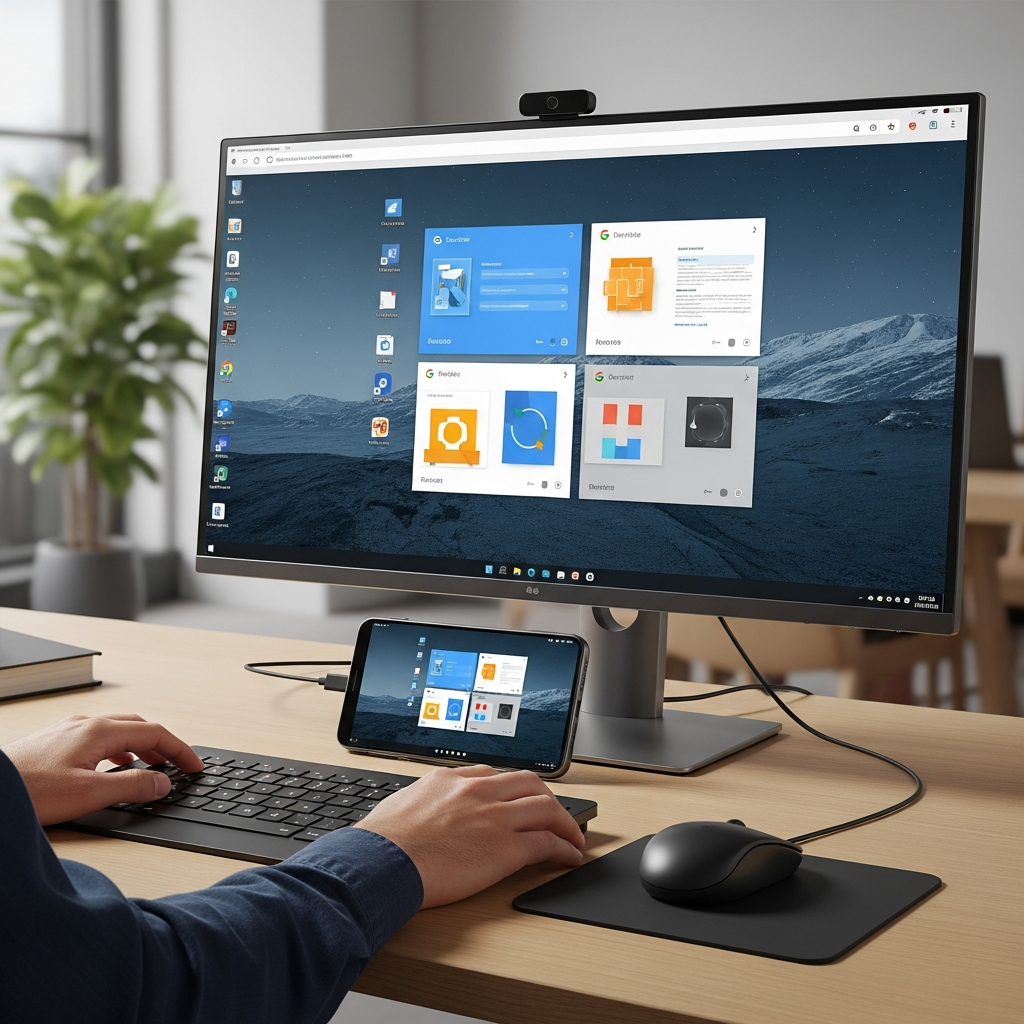
Historically, our phones handled quick messages and social media, while laptops were reserved for “real work.” This clear distinction is rapidly dissolving. Android 16’s desktop mode enables a fundamental shift in user experience. When you connect your smartphone to an external monitor via a standard USB-C cable and pair a Bluetooth keyboard and mouse, you’re no longer just mirroring a zoomed-in phone screen. Instead, you’re greeted with a sophisticated desktop workspace that feels remarkably familiar to a traditional operating system, designed from the ground up to maximize productivity.
How Android 16’s Desktop Mode Transforms Your Phone
The core appeal of this new Android 16 desktop mode lies in its intuitive and powerful features. Google has meticulously engineered the experience to emulate the best aspects of desktop computing while retaining the versatility of Android. This isn’t merely an overlay; it’s a deeply integrated system that unlocks genuine multitasking potential.
Free-Form Windows and Intuitive Multitasking
One of the most significant advancements is the introduction of “free-form” windowing. This means you gain the ability to resize, overlap, and reposition applications on your external display just as you would on Windows or macOS. No more fixed split-screen views; you have complete control over your workspace layout. A dedicated taskbar at the bottom of the screen provides quick access to pinned apps, running programs, and system notifications, mirroring the efficiency of traditional desktop environments. This level of control dramatically enhances the ability to juggle multiple tasks simultaneously, from drafting documents to managing communications.
Enhanced Productivity with Independent Screens
A standout feature that truly elevates the native desktop mode experience is the independence of the screens. Imagine working on a complex spreadsheet or drafting a lengthy report on your large monitor, while your phone’s screen remains entirely free. This means you can keep your phone display open for incoming messages, video calls, or quick app access without disrupting your primary workflow on the external screen. This dual-display functionality is a game-changer for professionals and power users alike, offering unparalleled flexibility and focus. Furthermore, the system supports sophisticated multi-monitor setups, allowing you to expand your digital canvas even further, spreading applications across several displays for ultimate spatial management.
The Tablet Advantage: Seamless Multi-Display Work
While phones are at the forefront, the benefits of Android 16 QPR3 extend wonderfully to tablets. Devices like the Pixel Tablet or Samsung Galaxy Tab series gain an even more expansive and integrated workspace. When these tablets are connected to an external monitor, the system can seamlessly extend the desktop environment across both the tablet’s native display and the external screen. This means you can fluidly drag windows and move your cursor between the tablet and monitor, creating a truly unified and expansive workspace for content creation, complex analysis, or advanced productivity tasks. It represents a significant step towards making Android tablets even more viable as primary computing devices.
A Strategic Leap: Evolution Over Revolution
Google’s introduction of Android 16’s desktop mode isn’t a sudden invention but rather the culmination of years of development and a strategic vision. While it feels revolutionary for the core Android experience, it also builds upon existing industry efforts and acknowledges a clear demand for more versatile mobile computing.
Learning from DeX, Building for the Future
For those familiar with the Android ecosystem, the concept of a smartphone-powered desktop is not entirely new. Samsung, for instance, has offered its DeX experience on its flagship devices since 2017. DeX has provided a robust desktop environment for Samsung users for years, demonstrating the viability and demand for such a feature. Google’s move is significant because it brings this capability directly into the Android core, ensuring a consistent and standardized experience across the wider Android ecosystem. This collaborative approach, where Google works with partners like Samsung, indicates a commitment to a unified standard rather than fragmented proprietary solutions. It means better app compatibility and a more reliable experience for everyone.
The Vision: A Unified Android & ChromeOS Ecosystem
This integration of a native desktop experience is a crucial piece of Google’s broader strategy. The company has long hinted at a future where the best aspects of Android and ChromeOS converge. By bringing advanced windowing, taskbar functionality, and multi-monitor support directly into Android, Google is paving the way for a more unified and adaptable platform. While some apps may still default to a vertical phone view initially, the trajectory is clear: a single, powerful platform capable of excelling in both mobile and desktop contexts. This future promises greater developer efficiency and a more seamless user experience across a range of devices, from phones to tablets and potentially even future hybrid form factors. The ultimate goal is to allow users to switch between mobile and desktop contexts effortlessly, picking up where they left off, regardless of the screen size.
Availability and What to Expect
Excitement is building, and users are eager to get their hands on this transformative feature. Google is rolling out the Android 16 desktop mode in a phased approach, ensuring stability and optimal performance.
Pixel Devices Lead the Way
As of March 2026, the native desktop mode is becoming generally available to Pixel 8 and newer devices. This rollout is part of the March 2026 Pixel Drop, a regular update cadence that brings new features and improvements to Google’s flagship phones. Pixel devices typically receive the latest Android updates first, giving their users exclusive early access to this stable release. If you own a compatible Pixel, you’ll find this feature easily accessible without needing to delve into “Developer Options” as was sometimes the case with experimental features in the past.
Broader Adoption on the Horizon
While Pixel devices are the initial beneficiaries, Google’s intention is clear: this is not a Pixel-exclusive feature. As other Android manufacturers integrate Android 16 QPR3 into their custom software skins and updates in the coming months, we can fully expect this powerful desktop mode to become a standard offering across the high-end Android landscape. This widespread adoption will solidify its position as a core Android capability, transforming how millions of users perceive and utilize their smartphones. Developers will also increasingly optimize their applications for this desktop environment, further enhancing its utility and appeal.
Frequently Asked Questions
What exactly is Android 16’s native desktop mode?
Android 16’s native desktop mode is a new feature within the Android 16 QPR3 update that allows eligible smartphones to connect to an external monitor and transform into a full desktop-like environment. Instead of merely mirroring the phone’s screen, it provides a dedicated workspace with free-form windowing (resizing and overlapping apps), a taskbar, and support for multi-monitor setups. Users can connect via USB-C and use Bluetooth peripherals to enjoy a PC-like experience, significantly enhancing productivity and multitasking capabilities directly from their phone.
Which Android devices will support the new desktop mode initially?
The native desktop mode is initially rolling out to Google’s Pixel 8 and newer Pixel devices as part of the March 2026 Pixel Drop. Being the first to receive the latest Android updates, Pixel phones have exclusive access to this stable release. However, Google intends for this to be a core Android feature, and other manufacturers are expected to integrate Android 16 QPR3 into their high-end smartphones and tablets in the coming months, making the desktop mode widely available across the Android ecosystem.
How does Android 16’s desktop mode compare to existing solutions like Samsung DeX?
While Samsung’s DeX has offered a similar desktop experience on its devices since 2017, Android 16’s native desktop mode represents its official integration directly into the core Android operating system. This is a significant difference because it promises a standardized, consistent experience across all manufacturers who implement Android 16 QPR3, fostering broader app compatibility and less fragmentation. Google has collaborated with partners, including Samsung, to ensure this consistency, signifying a strategic move towards a unified platform rather than proprietary solutions.
The Future of Mobile Productivity is Here
The introduction of Android 16 desktop mode is more than just a new feature; it’s a testament to the evolving power and versatility of our smartphones. By seamlessly bridging the gap between mobile and desktop computing, Google is unlocking unprecedented levels of productivity and flexibility for users. From professionals needing to juggle complex tasks on the go, to creatives seeking an expansive digital canvas, the ability to transform your phone into a powerful workstation is now a practical reality. As this technology matures and app optimization improves, the future of computing will increasingly blur, with our Android devices at the very heart of this convergence. Embrace the change: your next powerful desktop might just be in your pocket.